WebRTC Latency: A Breakdown

· 9 min read
Christian Fritz
Founder & CEO of Transitive Robotics

Many robotics companies are interested in very low latency video-streaming from their fielded robots, whether that's for tele-operation, tele-assist, or just monitoring. WebRTC has been setting the standard for low latency streaming but some people have started questioning whether even lower latencies are possible. To answer this, one needs to understand where in the pipeline the latency comes from. This is the question we tackle in this post: we break down the glass-to-glass latency of Transitive's WebRTC streaming pipeline that is used in WebRTC Video, Remote Teleop and other capabilities.

tl;dr
  • The vast majority of glass-to-glass latency comes from the camera itself and the USB bus (~100 ms).
  • H264 encoding and decoding add around 10 ms each (or less).
  • WebRTC only adds around 10 ms of latency for remote streaming.
  • The rest is due to static network delay ("ping timing", speed of light).

Methodology: Measuring Glass-to-glass Latency

Before we can meaningfully break down latency we need to define it and devise a measuring setup.

Definition

Glass-to-glass latency denotes the time it takes from the moment an image is captured by the lens (the "source glass") of the camera until that same image is displayed on an operator's computer monitor (the "destination glass").

The only way to measure this latency reliably and accurately is using an infinite mirror setup. So that's what we did. We pointed a camera at the screen displaying the resulting image, overlaying a high-precision timecode on the image itself.

A camera pointing at a screen to create an infinite mirror, the screen showing the resulting infinite mirror effect including a timestamp.

This setup allowed us to capture screenshots showing a timestamp for each go-around of the loop in the same image:

Screenshot of an infinite mirror produced by pointing camera at screen displaying camera image including a high-precision timestamp.

In this image the bottom timestamp is the one currently visible on the screen. The one above that, is the last one captured by the camera, transmitted to the computer, and displayed on the monitor. Hence the difference between these two is one sample of the glass-to-glass latency we want to measure. From this it is easy to, manually, read off the actual glass-to-glass latencies between the last few cycles. In the case of the screenshot above: 132 ms, 132ms, 136 ms, 132 ms. The oldest one, on top, is too ambiguous to tell.

We've repeated this setup with three different USB cameras: a RealSense D435, a Logitech C925e, and the 2MP HD wide-angle camera included with the Lerobot SO101-arm. Each one was connected to a desktop PC using USB3, with the PC running Ubuntu 24.04. The cameras were operated at 30 frames per second (hence adding a worst case latency of 33 ms) and the screen had a 60 Hz refresh rate (i.e., adding up to 17 ms of latency).

You can reproduce this setup using

  1. our Remote Teleop capability yourself,
  2. using Gstreamer, e.g., for local, direct connection without h264 encoding or webrtc:
    gst-launch-1.0 v4l2src device=/dev/video0 ! \
    image/jpeg,width=640,height=480,framerate=30/1 ! \
    jpegdec ! timeoverlay font-desc="DejaVu Sans, 36" ! \
    autovideosink
    or
  3. using a third-party tool like this one.

For each camera, we repeated this four times:

  1. "direct": displaying the camera feed directly on the same host without h264 encoding, webrtc transport, or decoding,
  2. "direct h264": encoding and then decoding that stream using H264 before displaying,
  3. "local webrtc": sending the stream over a local Transitive WebRTC connection,
  4. "remote webrtc": sending the stream over Transitive's WebRTC through a cloud proxy (TURN server) in Oregon, from California, where the round-trip time of pings to and from the cloud server was 30 ms.

The H264 encoding and decoding used in 2., 3., and 4. was done using a software encoder/decoder. In production, most of our users us hardware encoders such as those available on NVIDIA Jetsons, Intel NUCs, or RockChip SoCs. These further reduce the latency for encoding and decoding, but as we will see, those steps don't add much latency at all.

Did you know? WebRTC is not a protocol.

Given the name, it's easy to think that WebRTC is a protocol similar to TCP, UDP, or HTTP. But that's not the case. WebRTC is a collection of RFCs combining a myriad of protocols and technologies to provide real-time communications in the browser. These include ICE, RTP, RTCP, RTSP, SDP, FMTP, SCTP, RTX, TWCC, RED, FEC, H264, and more. These are implemented differently by different browsers and can be combined and configured differently depending on the application. So it is inaccurate to refer to WebRTC as one thing, and statements of the form "WebRTC is ..." should be taken with a grain of salt -- except perhaps for "WebRTC is complicated".

Results

For the four cases above we've measured total latencies of approximately:

  1. "direct": 110 ms.
  2. "direct h264": 130 ms.
  3. "local webrtc": 130 ms.
  4. "remote webrtc": 170 ms.

These results did not noticably change between the three cameras we tested.

A breakdown of the latency stack-up of video streaming pipelines with and without webrtc.

Interpretation

Since we know the camera frame interval (30 fps = 33 ms) and the display refresh rate (60 Hz = 17 ms), we can derive the time it takes for the camera to capture, process, and transmit a frame to the computer over USB and for the computer to send it to the display. This is how we computed the latency induced by the blue box in the diagram. Once that is determined from the first case ("direct"), we can sequentially infer the additional latency in the subsequent cases (2., 3., and 4.) by H264 encoding and decoding (10 ms each), local streaming via WebRTC (barely noticeable), and remote streaming (~40 ms of which 30 ms is static network delay as measured by ping).

Interestingly, local h264 encoding followed by h264 decoding had the essentially the same latency as h264 encoding followed by local WebRTC transmission followed by h264 decoding. This means that when the network is perfect, WebRTC does not add any significant latency at all.

We cross-validated these findings using statistics provided by chrome://webrtc-internals:

  • "local webrtc": ~7 ms latency from jitter buffer
    Jitter buffer delay on a local WebRTC connection reported by webrtc-internals

  • "remote webrtc": ~10 ms latency from jitter buffer
    Jitter buffer delay on a remote (relay) WebRTC connection reported by webrtc-internals

These statistics confirm our findings shown in the breakdown in the figure above.

What's a jitter buffer?

Because WebRTC uses UDP, the transport layer does not guarantee packet arrival and sequencing. The application layer needs to account for that. This is a feature because it allows the application to ignore missing frames when they are old, but it also means that it may need to re-order packets as they arrive. This is what the jitter buffer is for. It's a very short-lived buffer that ensures frames arriving out-of-order are assembled back according to their sequence number.

Conclusions

When evaluating and comparing video-streaming and tele-operation solutions, it is important to be precise about what is being compared in order to avoid comparing apples 🍏 and oranges 🍊. The infinite mirror setup is the most reliable and accurate way to measure glass-to-glass latency. Used correctly, it quickly reveals where latency is introduced in the pipeline and "WebRTC", or more precisely the components and technologies used to implement it, do not add any significant latency: only around 10 ms, even on remote connections that require proxying in the cloud. Robotics companies interested in reducing latency are better advised to look at high-speed cameras and connection technologies like GMSL.

In practice, there are many more properties of a tele-operation solution to consider besides average latency. These include:

  • congestion control: how well it maintains low-latency when available network bandwidth fluctuates;
  • robustness: how well it handles packet loss;
  • compute efficiency: how efficient it is grabbing frames from video sources such as USB cameras, ROS topics, or RTSP streams and how efficiently it encodes those streams;
  • maturity and reliability: safety is critical when remotely operating physical devices and 99.9% reliability is not achieved over night but only after many years of real-world usage under varying conditions; and
  • bandwidth efficiency.

In fact, it is not uncommon to use 15 fps for tele-operation. While this adds up to 67 ms of latency (frame to frame delay), it reduces resource usage on multiple other fronts making it a good compromise under many real-world circumstance.

If you are considering options for streaming video from your robots, we invite you to try our WebRTC capabilities such as WebRTC Video and Remote Teleop. Please reach out if you have questions or would like to learn more (links in the footer). We can also help you design a test setup for measuring latency and performance under degraded networking conditions.

Announcing Transitive 2.0

· 6 min read
Christian Fritz
Founder & CEO of Transitive Robotics

We are thrilled to announce a new major version of Transitive, the open-source framework for full-stack robotics. Version 2.0 adds significant new integrations and features: storage of historic and time-series data in ClickHouse, visualization in Grafana, and custom alerting via Alertmanager. Some of our capabilities, like the free Health Monitoring capability, already use these features, providing significant added value to robotics companies with growing fleets.

Did I mention dark mode?

Fleet Operation at Scale

Until now Transitive has been very much focused on transactional features needed for the operation of robot fleets. This includes our most popular capabilities: WebRTC Video streaming, Remote Teleop, and ROS Tool. These capabilities are particularly empowering to robotics companies that have not yet deployed more than 50 robots. Transitive's open-source MQTTSync data protocol, its realization of full-stack packages, and the built-in fine-grained authentication and authorization features, provided a solid foundation for us to build such transactional capabilities efficiently and reliably.

But as fleets grow so do the challenges in monitoring and operating. This means that companies need tools that go beyond the direct form of one operator working on one robot at a time, but provide both longitudinal as well as historic views of the fleet. Similarly, passive monitoring and alerting need to gradually replace active monitoring by (remote) operators. Supporting robotics companies in this, second chapter of growth was our goal in this new major release, while still staying true to our philosophy of embeddability, ease of use, and fine-grained, namespaced access control.

Store: ClickHouse

There are many great open-source databases to choose from, but we found ClickHouse to be the most versatile and highest performing for the types of robotics data we have seen companies ingest, analyze, and visualize. ClickHouse is a highly-efficient, columnar data store that is already being used by many AI and robotics companies incl. Open AI, Anthropic, and Tesla. We found its column-based data layout ideal for on-disk compression as well as temporal analysis of robotics data.

Transitive 2.0 integrates ClickHouse along multiple dimensions. First, the docker-compose file includes and configures a ClickHouse instance, adding it in both the hosted solution on transitiverobotics.com as well as any self-hosted deployments. Second, Transitive automatically provisions per-Transitive-user accounts in ClickHouse and adds the necessary ROW POLICYs to extend Transitive's namespace-based access control. Third, for developers, it provisions a designated ClickHouse database for each capability as well as several convenience functions in the @transitive-sdk/clickhouse npm package to write to and query the database. This also includes a deep integration with MQTTSync itself. Capability developers can now register specific MQTT topics to be stored in the database, and they can just as easily query this history, e.g., for simple visualizations. The Health Monitoring capability, for instance, uses this to render sparkline plots of health sensor histories directly in the UI components you can embed in your own dashboards:

Health Monitoring: sparklines

Similarly, the robot-agent itself stores and visualizes the last 24 hours of heartbeats from your robots, making it easy to see online and offline periods:

Heartbeat history, showing the last 24h of online status of robots

More details: Documentation – ClickHouse

Visualize: Grafana

Grafana is a popular and powerful framework for creating visualizations and data-driven dashboards, exactly what robotics companies need to get an overview of the health and operational status of their fleet. It is also well suited for diving deeper into this data, especially for plotting time-series.

Transitive now includes a Grafana instance that uses the aforementioned ClickHouse accounts as data-source. Like the integrated ClickHouse instance it is auto-provisioned to include a separate organization for each Transitive user, both in hosted as well as self-hosted. Access control is configured to mirror the same principles as used elsewhere in Transitive: orthogonal per-user/-device and/or per-capability permissions. Among them is the ability to provide short-term access to capability and device specific plots of historic MQTT data, all encoded in a versatile URL. This URL, which capabilities can programmatically generate on-the-fly, is used to embed Grafana visualizations or to link to a full dashboard the user can use to explore further. Here is an example visualizing ROS diagnostics data plotting GPU temperature and utilization.

Grafana MQTT History

Transitive capabilities can further provision capability-specific assets directly into Grafana now, to provide users with custom dashboards and alert templates that the capability author deems useful for working with the data collected by the capability.

More details: Documentation – Grafana

Alert: Alertmanager

Included with Grafana is the powerful Alertmanager, the same one used by Prometheus. It can be thought of as a switchboard: data in, notifications out, with intelligent routing in the middle. Its integration into Transitive means that you can define complex SQL queries against your MQTT and capability-specific data in ClickHouse that trigger alerts. Separately, you can define specific policies for notifying specific "contact points" such as Slack, PagerDuty, or custom webhooks when these alerts trigger.

Define alert conditions via SQL

The Health Monitoring capability demonstrates one use of this. It automatically provisions an alert template that users can copy and configure to receive notifications when a robot has become unhealthy and may require attention.

More details: Documentation – Alerts

Try it out!

If you are a user of our hosted solution, there is nothing you need to do to try out these new features, they are already included in the capabilities you use. If you are using Health Monitoring, for example, you will already see all the above mentioned features, which will let you explore your recent ROS /diagnostics history, visualize it, define your own dashboards around it, and configure alerts. If you are not yet using Transitive, you can create a free account and install these capabilities on your robots.

If you prefer to self-host Transitive in your own cloud, on-prem, or directly on your robots for offline-use, you can follow our instructions for self-hosting to bring up the Transitive stack in your dev environment where you can also start writing your own capabilities. If you do, please let us know and consider submitting your capability to the official capability store if it's something that might be useful to others, too.

Finally, if you have questions, email us or ask them in our community Slack, we always respond.

Transitive Core Concepts — #1: Full-stack Packages

· 10 min read
Christian Fritz
Founder & CEO of Transitive Robotics

Transitive, the open-source framework for full-stack robotics, is built on three core concepts: full-stack packages, real-time data-synchronization with full-stack reactivity, and topic-based access control. In this post, as part of a mini-series exploring these concepts, we will describe the former.

The Need for Full-stack Packages

Software package managers serve three high-level functions: they define a standard format for packages incl. versioning, they provide dependency resolution, and they (typically) provide a mechanism for the distribution and installation of these packages. There exist a good many package managers, typically tied to a specific context, e.g. apt, yum, snap, npm, yarn, pip, uv, and cargo, to name just a few. It would seem plausible that at least one of these existing package managers would be suitable for managing robotic software as well, but they are not and that is due to a very specific need in robotics: cross-device dependency management.

Announcing transAct: An open-source robot fleet management dashboard template

· 3 min read
Christian Fritz
Founder & CEO of Transitive Robotics

We are excited to announce transAct, an open-source dashboard template for robot fleet management!

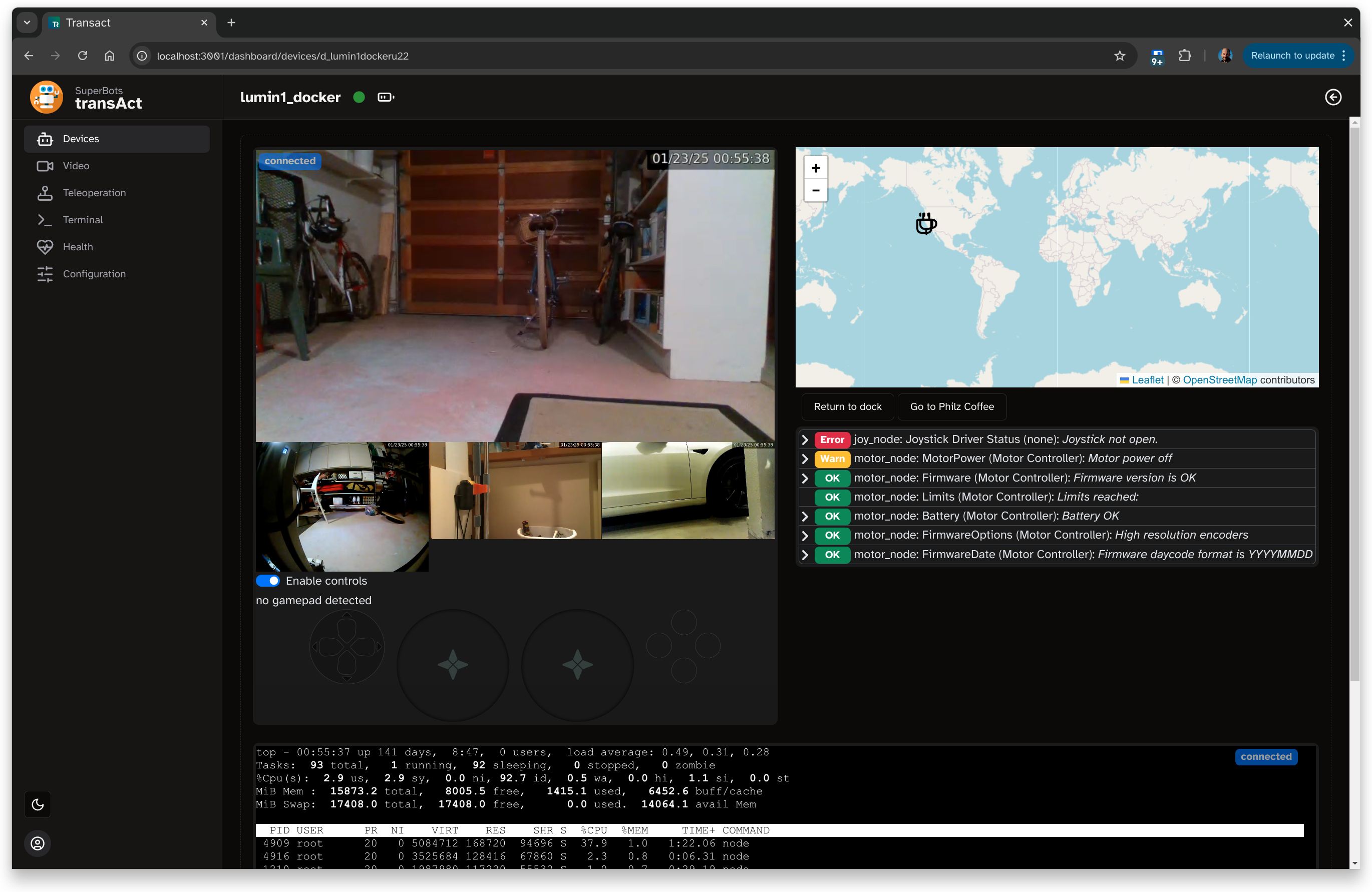
Device page incl. live video, remote control, map, ROS diagnostics, and a terminal.

Device page incl. live video, remote control, map, ROS diagnostics, and a terminal.

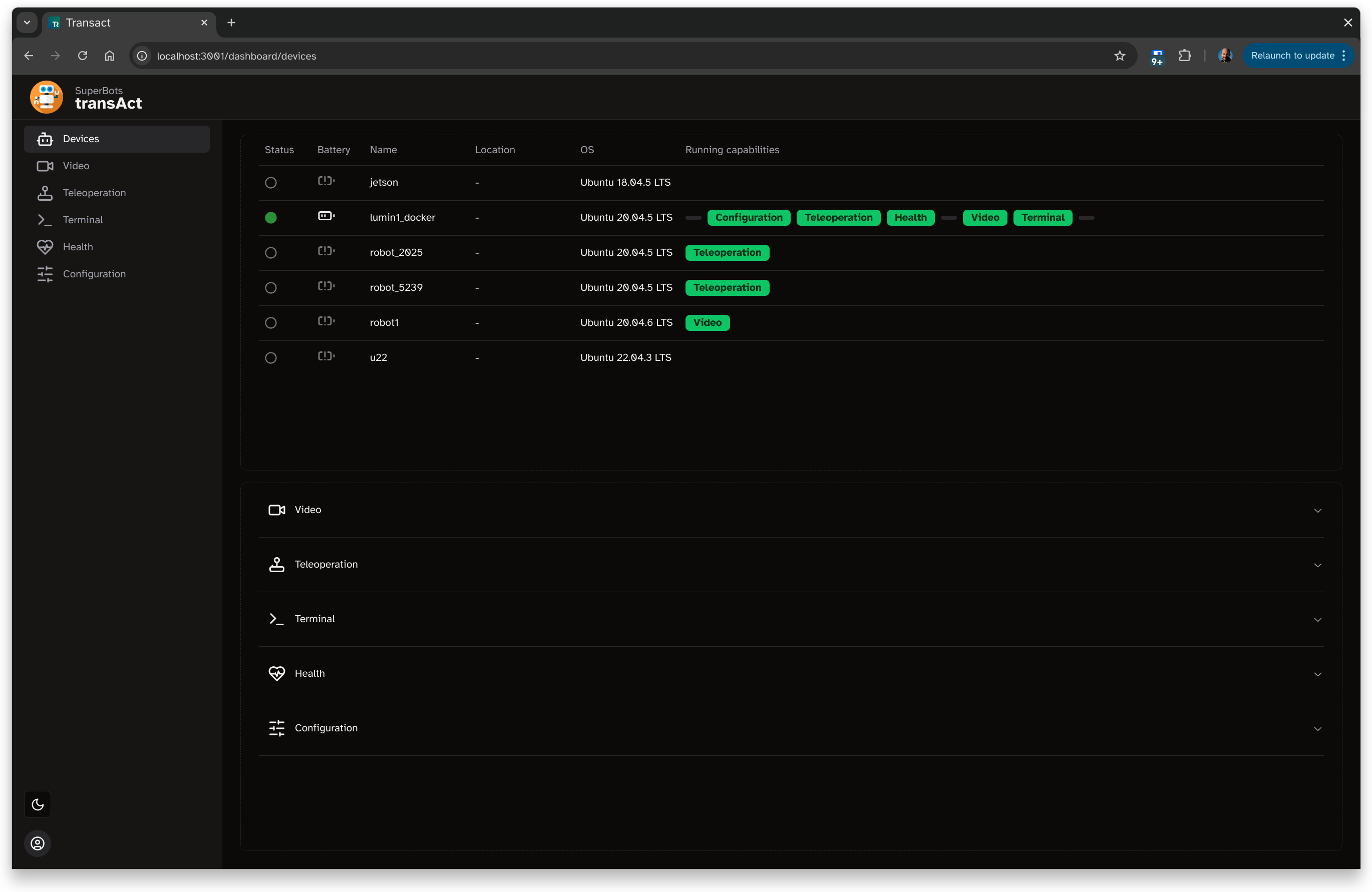
Devices page, listing all robots in the fleet and their installed capabilities.

Devices page, listing all robots in the fleet and their installed capabilities.

Why We Built It

Robotics companies with fleets of more than a handful of robots need web dashboards to monitor and operate their fleets. They enable non-engineers to monitor, triage and sometimes fix issues in the field, which is required for operational efficiency and to free engineers from daily interruptions. This is particularly important with a RaaS business model. But who builds these dashboards? Engineers are already spread thin due to the large number of aspects of robotics they need to attend to (hardware, firmware, drivers, robotics stack, cloud, web) so building their own web dashboards from scratch is challenging, especially since the skills required for web development are quite different from the rest of the robotics software stack.

Robot Fleet Management: Make vs. Buy? An Alternative

· 13 min read
Christian Fritz
Founder & CEO of Transitive Robotics

It is an exciting time! You have successfully completed several customer pilots and are deploying your next batch of five to ten robots to the field. This is the moment of truth you have been working towards, through all the hardship of starting a robotics company. The moment where you can see market fit and start to grow. From here it will be all downhill, right? Not so fast! The difference between building and deploying a small number of prototypes and scaling to tens, hundreds, and thousands of fielded robots is vast. The name of the game in Robotics-as-a-Service and related vertically integrated business models is "operational excellence". You need to be able to deploy, monitor, and manage that fleet as it grows and your cost must not grow proportionately. You and your team need to get ever more efficient at operating that fleet, just like the mean time between failure of your hardware needs to increase.

Of course, as with virtually any challenge in robotics, we can call technology to the rescue. Software to be exact. Putting the right software tooling in place will allow you to more efficiently perform all tasks of fleet management, enable non-roboticists to triage and resolve issues, and reduce the number of times engineers are called to the scene (literally or remotely). This is key in reducing your cost and allows you to tap more resources. Furthermore, software is what will allow you to visualize to your customers the value you generate for them, providing them dashboards and reports that answer the question: "what have those robots done for us lately?" This is important, not only before contract renewal, but also every time a stakeholder at your customer changes or you want to increase the number of robots deployed at your customers.

The only problem: building a fleet management system from scratch is hard!

Make vs. Buy

It is hence natural, and prudent, to consider using a third party fleet management solution rather than building your own. Why reinvent the wheel if someone has already done it? As it turns out, neither buy nor make are good options.

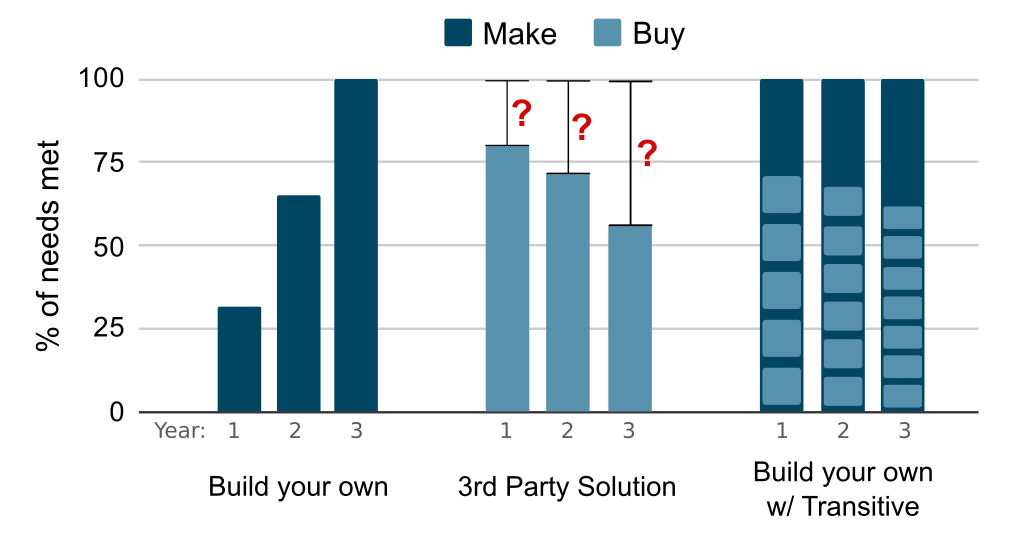
Chart showing 3 options for building robot cloud portals

Three ways to set up a robot fleet management system: comparing amount of work and degree of completeness over time. The area in dark blue represents the amount of work and time required to make your own. The larger the area, the more work it is.

Announcing Transitive Self-hosted

· 8 min read
Christian Fritz
Founder & CEO of Transitive Robotics

We are thrilled to announce the self-hosted version of Transitive, the open-source framework for full-stack robotic software.

Transitive has been used in production every day by many robotics startups for over a year now but until today the only way to use it was via the hosted version on transitiverobotics.com. The hosted version is ideal for any robotics company that wants to add new capabilities to its fleet quickly, such as low-latency video-streaming or configuration management. But Transitive's vision has always been to create and support an ecosystem of developers who want to develop and share their own full-stack robotic capabilities. We believe this has the potential to accelerate the development of new and exciting robotic applications similar to how ROS has advanced this industry before. Before ROS, developing your own robotics product meant you also had to develop your own robotics communication middle-ware and a lot of the necessary software modules, incl. SLAM and navigation. With the advent of ROS and its ecosystem of packages, startups could not only move faster, they could also get to market with a lot less capital and reach profitability sooner. We aspire to give robotics startups another boost of this kind by creating a framework that makes it easy to connect robots to the cloud and web front-ends, provides the same level of openness as ROS, and supports sharing of packages, which we call capabilities.

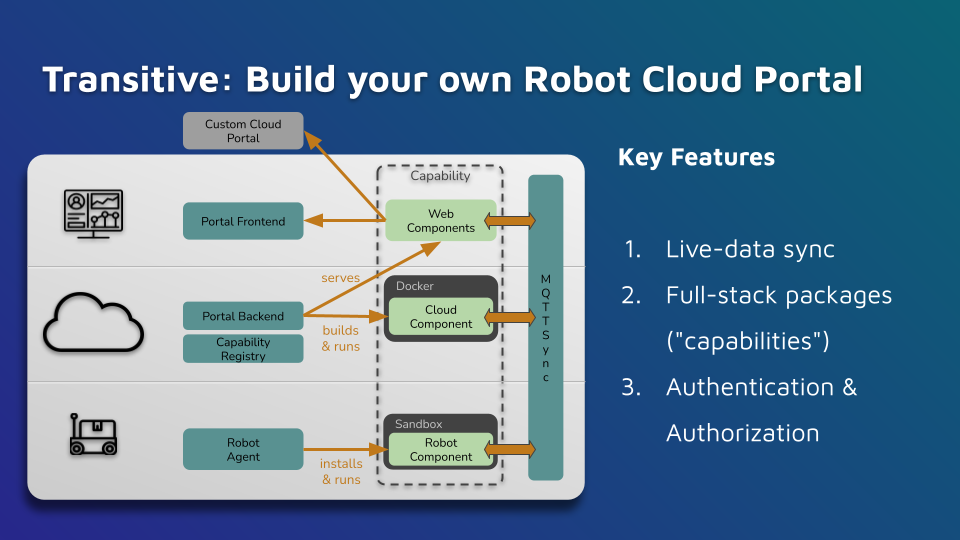
Architecture

5 Ways to Stream Video from Robots and Why You Should Use WebRTC

· 14 min read
Christian Fritz
Founder & CEO of Transitive Robotics

There are many reasons and circumstances that require a robot operator to see through the eyes of a robot from afar. This is obviously the case for robots that are remote controlled, but the need also arises with autonomous robots. Examples include incident resolution, where a robot calls for help because it is aware of a problem it cannot resolve on its own, or after a customer reports an issue with the robot. Other examples include routine fleet monitoring, applications where robots are used for remote inspection, and AI applications that process video data in the cloud. In fact sight is such a fundamental sense to humans that the ability to "see at a distance" feels so enabling to robotic customers that, whenever possible and appropriate, a robotics company is well advised to offer it to its users.

Announcing our Public Beta

· One min read
Christian Fritz
Founder & CEO of Transitive Robotics

We are thrilled to announce our public beta! Anyone can now create an account and try our robotic capabilities like webrtc video streaming and remote-teleop. New users receive $100 credit while we are in beta. Try it out and let us know what you think!

Read the full announcement here: https://www.therobotreport.com/transitive-robotics-opens-beta-of-remote-operations-solution/

Interview on the Sense Think Act Podcast

· One min read
Christian Fritz
Founder & CEO of Transitive Robotics

In this episode, Audrow Nash speaks to Christian Fritz, CEO and founder of Transitive Robotics. Transitive Robotics makes software for building full stack robotics applications. In this conversation, they talk about how Transitive Robotic's software works, their business model, sandboxing for security, creating a marketplace for robotics applications, and web tools, in general.

Sense Think Act Podcast: 15. Full-stack Robotics and Growing an App Marketplace, with Christian Fritz